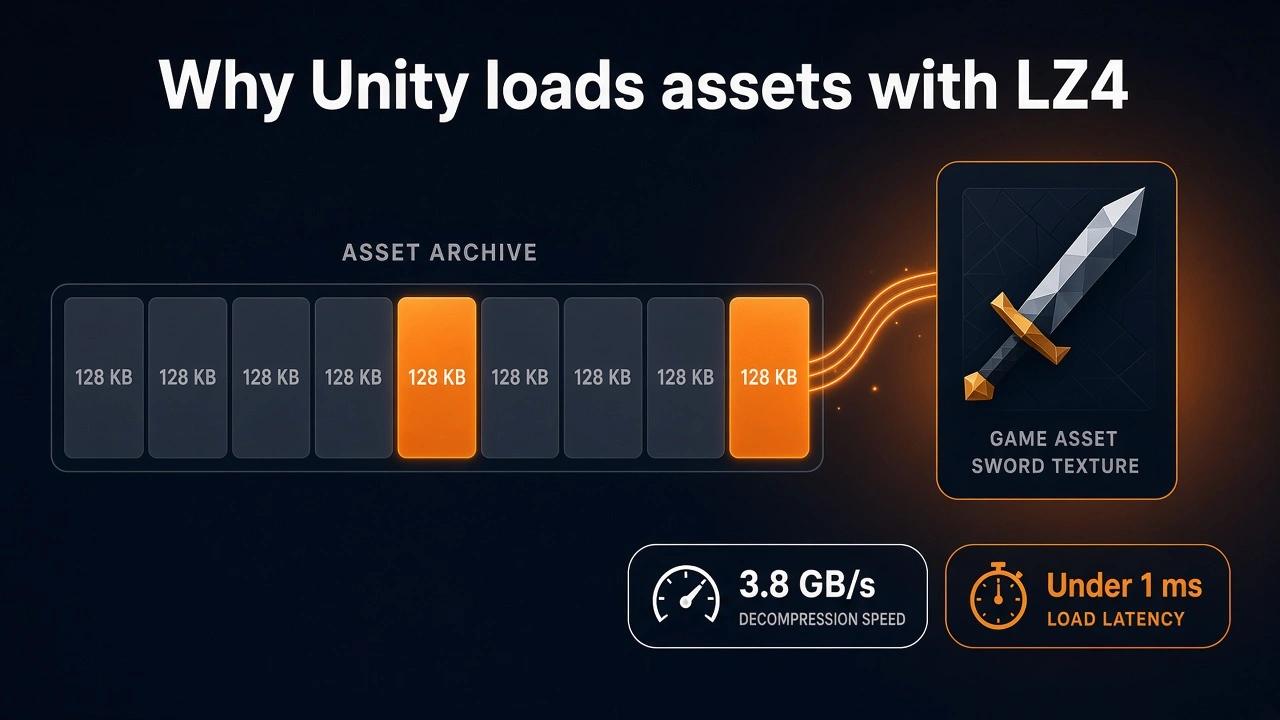
LZ4 is the compression format behind fast asset loading in Unity: the AssetBundle cache, the player data archive and the Addressables default. We explain why skipping the bit coder makes it decompress at gigabytes per second.
By Tim UhlottFounder|Last updated: November 13, 2026|9 minutes read
dataunitycompression
LZ4 is the compression format you meet whenever Unity loads something fast. It is the format of the AssetBundle cache, of the data.unity3d archive in a player build, and of every Addressables group with default settings. It is not the format that makes files smallest. It is the format that makes them cheap to open.Let us look at how LZ4 works, why its decompression is so quick, and what the measured numbers look like. If you want LZ4 against LZ4HC and LZMA for a Unity project, our comparison article covers that decision.
A short history
LZ4 was written by Yann Collet and published in 2011. Collet later joined Facebook and created Zstandard, but LZ4 stayed a separate project with one goal: decompression speed close to a plain memory copy. The format is frozen and documented on GitHub (opens in a new tab). It is used in the Linux kernel, in file systems like ZFS and btrfs, in databases, and in game engines. Unity added it for AssetBundles in version 5.3 (2015).
How LZ4 works
Most compressors do two jobs. First they find repeated byte sequences and replace them with short back references: "copy these bytes from earlier in the file" instead of writing them again. Then they squeeze that stream a second time. A bit level coder such as Huffman coding or a range coder gives common values short bit codes and rare values long ones. A byte that shows up over and over can cost a fraction of its original 8 bits.LZ4 only does the first job. The references and the leftover bytes stay as whole bytes. The file stays larger, and the decoder only has to copy. That is the whole trick.
Finding repeats
The compressor walks through the data and keeps a small hash table of positions it has seen. For each new position it checks whether the next 4 bytes appeared before within the last 64 KB. If yes, it has a match and writes a reference. If no, the byte stays as it is (a literal).
The output format
LZ4 writes the result as a series of sequences. Each sequence is a token byte, some literal bytes, and a match.
token      : 4 bits literal length, 4 bits match length
literals   : the bytes to copy as they are
offset     : 2 bytes, how far back to copy from (max 65,535)
match      : extra length bytes if the match is longer than 19
Every field is a whole byte or more. There is no bit packing and no table to decode. A decoder reads the token, copies the literals, jumps back by the offset, copies the match, and moves to the next sequence. That is a handful of machine instructions per sequence. It is why decompression runs at several gigabytes per second.Let us go through a small example. Take this piece of a text asset:
item_sword_01;item_sword_02;item_sword_03;
The first 14 bytes, item_sword_01;, are new and stay literal. From then on, every item_sword_0 is a match: "copy 12 bytes from 14 bytes back". Only the 2; and 3; remain as literals. The 42 byte line shrinks to about 25 bytes, tokens and offsets included.
What LZ4 gives up
Because there is no second coding stage, the output still contains full 8 bit literals and full 2 byte offsets, even where fewer bits would do. Gzip, Brotli and LZMA all spend extra work there. LZ4 does not. That is why its files are noticeably bigger than theirs. The 64 KB window also means repeats further apart are missed.
The numbers
These are results from the lzbench 2.4 benchmark (opens in a new tab) by Przemysław Skibiński. The test file is the 211.9 MB Silesia corpus, a standard mix of text, source code, binaries and images. It ran on one core of an AMD EPYC 9555P. Ratio is compressed size as a percentage of the original, so lower is better.
Compressor
Compression speed
Decompression speed
Compressed size
Size vs. original
memcpy (no compression)
24,075 MB/s
24,002 MB/s
211.9 MB
100%
LZ4 1.10
550 MB/s
3,832 MB/s
100.9 MB
47.6%
LZ4HC 1.10 level 9
31.9 MB/s
3,703 MB/s
77.9 MB
36.8%
zlib (gzip) level 6
26.8 MB/s
314 MB/s
68.2 MB
32.2%
Brotli level 11
0.56 MB/s
383 MB/s
50.4 MB
23.8%
LZMA level 6
3.13 MB/s
78.4 MB/s
49.6 MB
23.4%
LZ4 decompresses about 12 times faster than gzip and about 50 times faster than LZMA, while its output is roughly twice as big as LZMA's. At 3.8 GB/s, decompressing a 100 MB bundle takes about 26 milliseconds. The same bundle in LZMA takes over a second.Compression is also fast. At 550 MB/s a build step that compresses 2 GB of assets finishes in a few seconds. That matters for iteration time. It is why Unity recommends plain LZ4 for development builds.
Takeaway: LZ4 trades a file about twice the size of LZMA's for decompression about 50 times faster.
LZ4 inside Unity
Unity does not compress a whole bundle as one LZ4 stream. It splits the content into 128 KB chunks and compresses each chunk on its own. This is what Unity calls chunk based compression. It is the reason an LZ4 bundle can stay compressed on disk while the game runs. To load one texture, Unity only has to decompress the chunks that hold that texture.A measurement published in October 2026 (opens in a new tab) shows the effect. The author built one 2048x2048 texture (12 MiB in memory) into three bundles and timed AssetBundle.LoadFromFile in a player build:
Bundle format
Time to open
Extra memory on open
LZMA
277 ms
+13.31 MiB
LZ4
under 1 ms
+0.26 MiB
Uncompressed
under 1 ms
about the same as LZ4
Opening the LZ4 bundle cost nothing noticeable. The texture itself was read later, during LoadAsset, and that took about 7 ms in all three cases.You get LZ4 in these places:
// AssetBundlesBuildPipeline.BuildAssetBundles(outputPath, builds, BuildAssetBundleOptions.ChunkBasedCompression, target);// Player build data (data.unity3d)BuildPipeline.BuildPlayer(scenes, outputPath, target, BuildOptions.CompressWithLz4);
In Addressables, LZ4 is the default Asset Bundle Compression for every group. In the Build Settings window it is the LZ4 option under Compression Method. On Android, Unity's docs note that switching from the default ZIP to LZ4 can be a real loading speed win, because LZ4 decompresses much faster than ZIP.When Unity downloads an LZMA bundle through UnityWebRequestAssetBundle with a version or hash, it recompresses the bundle to LZ4 before writing it to the cache. The player downloads the small LZMA file once and loads the fast LZ4 file from then on.
When LZ4 is the right tool
I would use LZ4 for anything your game reads from local storage during play: bundles in StreamingAssets, the player data archive, save files you load every session, and network messages where latency matters more than size.It is the wrong tool when the file crosses the internet and is only read once, for example a remote bundle download. There LZMA or Brotli save half the bandwidth for a one time decompression cost. And if build time is not a concern, LZ4HC gives you the same load speed with a smaller file. Both have their own articles.
Takeaway: LZ4 is for the disk, not for the download.
So keep LZ4 for what the game opens during play. Pick something smaller for what it downloads once. And before you switch a group, I would build it both ways and measure on a real device.
00 views
00 shares
Discussion about this post
No comments yet. Be the first to start the discussion.