How to stop global-metadata.dat reading in your Unity IL2CPP game
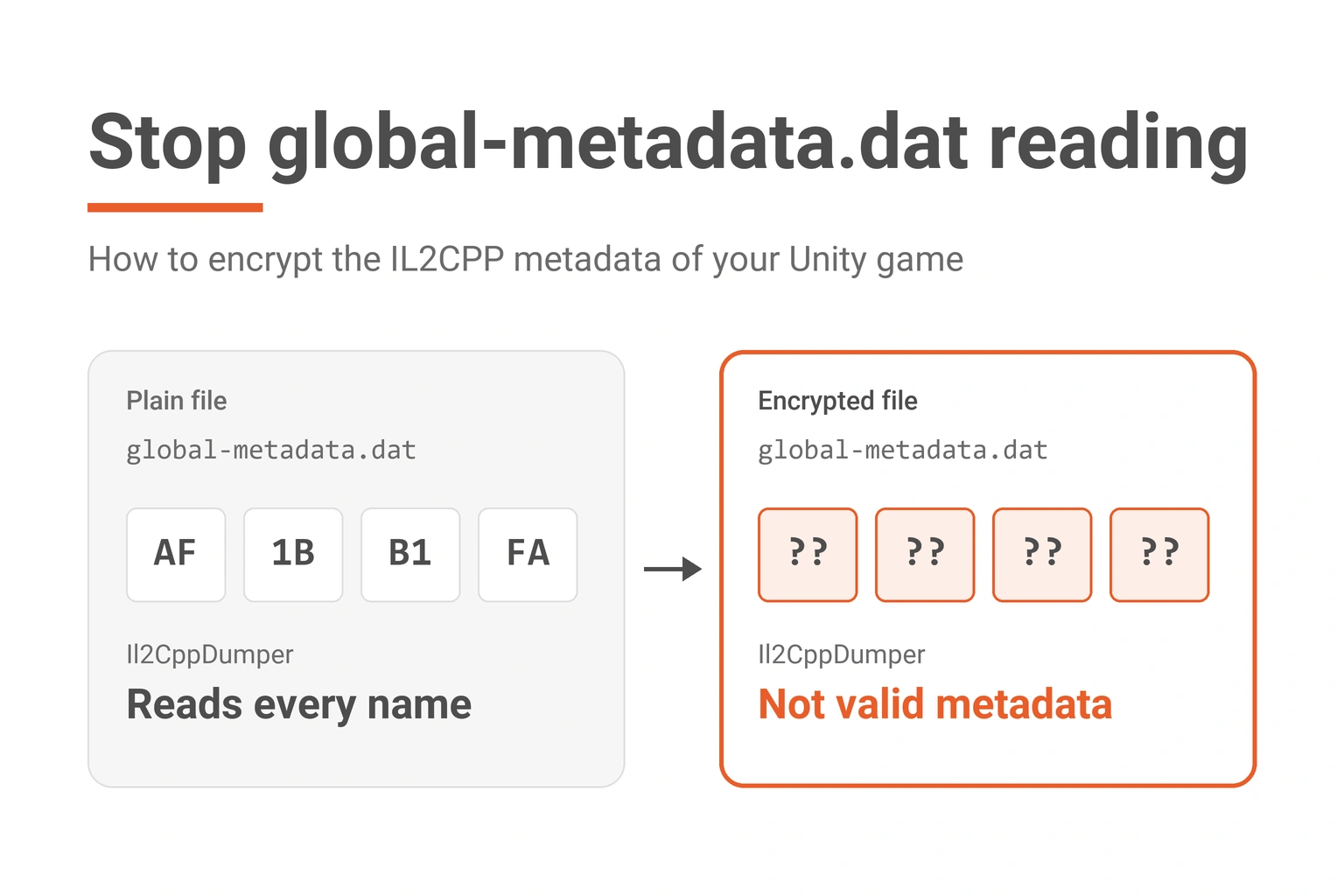
Tools like Il2CppDumper read global-metadata.dat to put your original names back onto an IL2CPP build. Here is what the file header looks like, how the tools use it, and how encryption stops them.
By Tim UhlottFounder|Last updated: November 27, 2026|15 minutes read
obfuscationil2cppunity
Someone downloads your Unity IL2CPP game. They copy two files out of the build folder, GameAssembly.dll and global-metadata.dat, and drop both into a free tool called Il2CppDumper. A moment later they have a list of every class, method, and field in your game, with the original names.They did not crack anything for that. They read a file that Unity ships with every IL2CPP build, in a format that is publicly known.You cannot remove this file, because the game needs it to start. But you can stop tools from reading it straight from disk, and that is what this article is about.Let us first look at what the file is and why Unity needs it, how the tools use the file, and how encryption stops them.
What is global-metadata.dat?
When you build with IL2CPP, Unity converts your C# code to C++ and compiles it into a native binary. On Windows that binary is GameAssembly.dll, on Android it is libil2cpp.so.Native code has no names. A compiled function is an address and some machine instructions. It does not know that it was once called PlayerWallet.Spend.All of that information goes into global-metadata.dat. The file is a catalog of your C# code: every type, every method, every field, every property, and every string.On Windows you find it here:
C# expects more from a runtime than C++ gives it. A few examples:
Reflection.GetType().Name, typeof(Player).GetMethods(), and GetField("health") all have to return real names.
Unity itself. A scene stores the class name of every MonoBehaviour on every GameObject. To load the scene, Unity has to find the class by that name.
Serializers. Such as JsonUtility, which match field names to JSON keys.
Exceptions. Printing a stack trace with method names.
String literals. The text "Not enough gold" in your code is stored in this file and loaded from there.
So the IL2CPP runtime opens the file once at startup and keeps it for the whole session. If the file is missing or broken, the game does not start.
Remember: The binary holds the code. The metadata file holds the names for the code. A tool that has both has a labeled map of your game.
What the file looks like
The file starts with a header, and after the header come the data tables. The header is a list of pairs. Each pair says where one table starts in the file (the offset) and how many bytes it has (the size).Unity ships the C++ source of the IL2CPP runtime with the editor, so the format is not a secret. Here is the header struct from the Unity 6000.0 runtime source (vm/GlobalMetadataFileInternals.h). The fields and their order are from Unity. I grouped them and added the comments above each group.
typedefstructIl2CppGlobalMetadataHeader{// Magic number and format version.int32_t sanity;int32_t version;// String literals: the text you wrote in C#.int32_t stringLiteralOffset;int32_t stringLiteralSize;int32_t stringLiteralDataOffset;int32_t stringLiteralDataSize;// Metadata strings: the names of all types, methods,// fields, properties, and parameters.int32_t stringOffset;int32_t stringSize;// Members: events, properties, and methods.int32_t eventsOffset;int32_t eventsSize;int32_t propertiesOffset;int32_t propertiesSize;int32_t methodsOffset;int32_t methodsSize;// Default values, for example "int gold = 1000"// or an optional parameter.int32_t parameterDefaultValuesOffset;int32_t parameterDefaultValuesSize;int32_t fieldDefaultValuesOffset;int32_t fieldDefaultValuesSize;int32_t fieldAndParameterDefaultValueDataOffset;int32_t fieldAndParameterDefaultValueDataSize;int32_t fieldMarshaledSizesOffset;int32_t fieldMarshaledSizesSize;// Method parameters and fields.int32_t parametersOffset;int32_t parametersSize;int32_t fieldsOffset;int32_t fieldsSize;// ... and much more!} Il2CppGlobalMetadataHeader;
That is 64 fields with 4 bytes each, so this header is 256 bytes long. The first table starts right after it.Open the file in a hex editor and the first bytes look like this:
AF 1B B1 FA 1D 00 00 00 00 01 00 00
Bytes
Field
Meaning
AF 1B B1 FA
sanity
0xFAB11BAF, lowest byte first
1D 00 00 00
version
29 in the source I looked at
00 01 00 00
stringLiteralOffset
256, the size of the header
The version number is different between Unity versions, and so is the header. Older versions have a few more tables, and newer metadata versions changed the layout again. The idea is always the same: a magic number, a version, and a list of where each table is.One thing is missing in this header. There is no machine code in the file. The names are here, and the code is in the binary.
How tools use it to reverse engineer your game
A disassembler like Ghidra (opens in a new tab) or IDA can open GameAssembly.dll on its own. But what it shows is close to useless at first. There are thousands of functions, and all of them have names like this:
It opens global-metadata.dat and checks the first four bytes for 0xFAB11BAF. If they do not match, it stops with "Metadata file supplied is not valid metadata file."
It reads the header and then every table: types, methods, fields, and strings.
It searches the binary for the two registration structs of the IL2CPP runtime. They hold the list of function addresses.
It joins both sides. Every method in the metadata gets the address of its function in the binary.
The result is a set of files. dump.cs lists every class in C# syntax, with field offsets and method addresses. The values here are only an example:
The DummyDll folder has rebuilt .NET assemblies without method bodies, which open in dnSpy or ILSpy. And script.json, together with ghidra.py or ida.py, carries the names over into the disassembler.After the script ran, the same functions in Ghidra look like this:
Before
After
FUN_1803a51c0
PlayerWallet$$Spend
FUN_1803a5240
PlayerWallet$$ValidateReceipt
Now the attacker searches for "Receipt" or "Gold" and lands in the right function. The field offset from dump.cs also tells a cheat where gold sits inside the object.
Takeaway: IL2CPP removes the C# code from the build, but it does not remove the names. They moved into one file with a public format.
How to stop it: Encrypt the file
Every tool above starts the same way. It opens the file and expects the magic number and a valid header. If the file on disk is encrypted, the first check fails and the tool stops.So the idea is simple. Encrypt global-metadata.dat during the build, and ship only the encrypted file.The catch is the game itself. The IL2CPP runtime reads the same file in the same format, and it does not know about your encryption. If you only encrypt the file, your game does not start anymore. So you also have to decrypt it at runtime, before the runtime looks at the first byte.That means we have to touch both ends: the build that writes the file and the runtime code that loads it.
Adjusting the IL2CPP code for writing and loading
Unity provides the IL2CPP runtime as C++ source inside the editor installation, in the il2cpp/libil2cpp folder. It is compiled together with your game on every build. That is what makes this possible at all.
The writing side
The file is written by Unity's IL2CPP converter during the build. So the encryption step has to run after the converter is done and before the player is packaged. The encryption itself is the easy part:
usingSystem.IO;publicstaticclassMetadataEncryptor{publicstaticvoidEncrypt(string path,byte[] key){byte[] data = File.ReadAllBytes(path);for(int i =0; i < data.Length; i++){ data[i]^= key[i % key.Length];} File.WriteAllBytes(path, data);}}
The hard part is the timing. On a Windows build the file is a normal file in the _Data folder, so a post build step can still reach it. On Android the file is packed into the APK or AAB, so you have to get in before the packaging.
The loading side
The runtime loads the file in vm/MetadataLoader.cpp. The function is short. In the Unity 6000.0 source it opens the file, maps it into memory, and returns the pointer:
void* il2cpp::vm::MetadataLoader::LoadMetadataFile(constchar* fileName){// ... builds the path and opens the file ...void* fileBuffer = utils::MemoryMappedFile::Map(handle); os::File::Close(handle,&error);// ...return fileBuffer;}
GlobalMetadata::Initialize calls it with "global-metadata.dat" and casts the result to the header struct from above. So this function is where the decryption goes. A sketch of the change:
void* fileBuffer = utils::MemoryMappedFile::Map(handle);int64_t length = os::File::GetLength(handle,&error); os::File::Close(handle,&error);// New: the mapped file is read only.// Decrypt into our own buffer and return that one.uint8_t* plain =(uint8_t*)IL2CPP_MALLOC((size_t)length);constuint8_t* encrypted =(constuint8_t*)fileBuffer;for(int64_t i =0; i < length; i++){ plain[i]= encrypted[i]^ s_Key[i % s_KeyLength];} utils::MemoryMappedFile::Unmap(fileBuffer);return plain;
UnloadMetadataFile in the same file has to change too. It unmaps the buffer, and now it has to free it.
What this costs you
It works, but I want to be clear about the maintenance.
The source belongs to the editor installation, not to your project. Every project on that Unity version builds with your change, and every Unity update replaces the file.
The loader differs between Unity versions, so the patch has to be checked for each one.
Every build machine and every teammate needs the same patched editor.
The file is no longer mapped from disk. It is copied into memory and decrypted at startup, which costs a little startup time and memory in the size of the file.
A mistake here does not give you a compile error in your game code. It gives you a build that crashes at startup, on one platform, after an update.
And do not ship the plain XOR from the sketch. The attacker knows what the first bytes of the decrypted file must be: the magic number, a small version number, and the header size. XOR the encrypted bytes with these known bytes and the key falls out. Use a real cipher, or at least a key stream that does not repeat.
What encryption does not stop
Encryption protects the file on disk. It does not protect the decrypted copy.The game has to decrypt the metadata to run, so the plain version sits in memory while the game runs. A more skilled attacker can dump it from the running process, or search the memory for AF 1B B1 FA. There are also dumpers that run inside the game and ask the IL2CPP runtime itself for all classes and methods. They never read the file. And the key has to be somewhere in your binary.So encryption stops the easy path: copy two files, run a tool. That is the path that needs no skill, and it is the one worth closing first.For the rest, there is a second step, and I would always combine the two. Rename your classes, methods, and fields with obfuscation before IL2CPP runs. Then the names that end up in the metadata are already meaningless. An attacker who gets through the encryption finds a.b.c and not PlayerWallet.ValidateReceipt. I explained why the order matters in Why most obfuscators for Unity fail.
Takeaway: Encryption hides the file from tools. Renaming makes the content worth less if someone reads it anyway. Use both.
Conclusion
global-metadata.dat is the name catalog of your IL2CPP game. The runtime needs it, the format is public, and tools like Il2CppDumper use it to put your original names back onto the native code.So do not ship it as plain data. Encrypt it during the build and decrypt it in the IL2CPP loader. Do not use a simple repeating XOR. And rename your code before IL2CPP runs, so the metadata has less to give away.You can do all of this by hand, as shown above. But then you patch the IL2CPP source for every Unity version and every platform you ship on. If you do not want to do that manually, have a look at the GuardingPearSoftware Obfuscator. It encrypts global-metadata.dat as part of the normal Unity build and takes care of the decryption at runtime. It also renames your classes, methods, and fields before IL2CPP runs, so both layers come from one tool.
00 views
00 shares
Discussion about this post
No comments yet. Be the first to start the discussion.